


MTM Link Member
4.52.02K Reviews
App Specs
- Version
- 4000.18.0
- Updated On
- License
- Free
- Downloads
- 100,000+
- Developer
- MTM, Inc
- Categories
- Maps & Navigation
- Platform
- Android
Screenshots

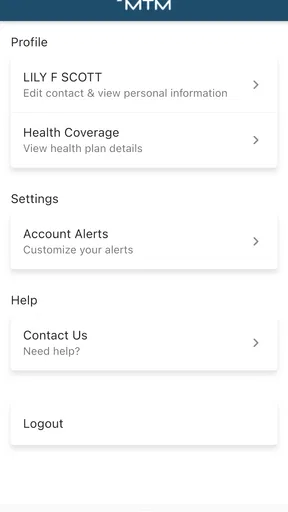
 Analysis by AppCompare
When I look at MTM Link Member, I see a focused ride-management app rather than another general-purpose organizer. That distinction matters: the useful question is not whether it can replace your calendar or map app, but whether it helps make arranging and keeping track of rides easier. If you regularly need transportation coordinated, that narrow purpose can be more helpful than a crowded collection of unrelated tools.
A ride-focused tool, not a general map
MTM, Inc makes this free Maps & Navigation app for people who need to manage rides. Its role is different from the familiar navigation apps many of us open to find a route: those are built around directions and traffic, while this app is centered on the ride-management side of getting from one place to another. I would treat them as potential companions, not automatic substitutes.
That difference also sets a sensible expectation. A ride-management app is most relevant when the ride itself needs attention, rather than when you simply want turn-by-turn directions for a drive. If your everyday need is only to compare routes, see traffic, or navigate a spontaneous trip, a conventional maps app is likely the more direct choice. If managing rides is the recurring task, a dedicated app is worth considering.
Where it fits in a normal routine
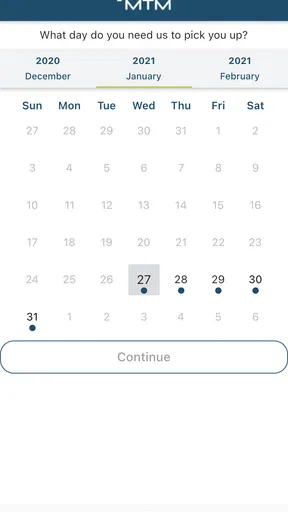
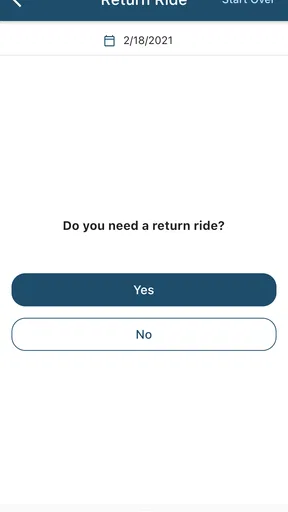
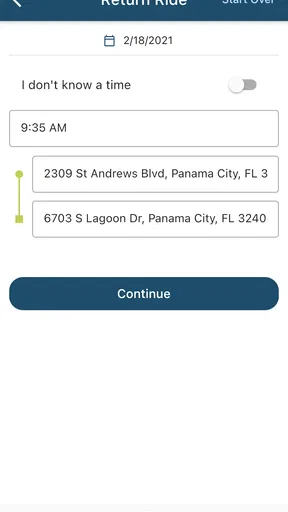
Imagine planning a trip that depends on an arranged ride rather than simply getting into your own car. You can use a dedicated ride-management app as the place to handle that part of the routine, instead of relying on memory or trying to make a map app serve a different purpose. Before depending on it for an important journey, I would open it in advance, check what the current trip workflow asks me to do, and make sure I understand where to look for ride details.
That preparation is especially useful when a family member or another person is helping coordinate transportation. Rather than assuming everyone will remember the same plan, the person using the app can get familiar with its ride-related steps and make sure the relevant details are in order. This is a practical habit, not a claim that the app includes any particular sharing feature: the benefit of checking ahead is avoiding last-minute confusion whatever the exact arrangement requires.
What its version history can—and cannot—tell you
The app was released on February 24, 2021, and its current version is 4000.14.1. That tells me it has a defined release history and that there is a current build to install, but a version number by itself does not explain which features changed or how a particular update affects an existing user. I would avoid reading a long number as proof that the app has added a particular capability.
For someone returning after a gap, the practical move is to open the installed app and review its current screens before relying on a familiar routine. An updated interface or a changed step can matter more than the number attached to a release. If you are installing it for the first time, start with the current version and learn the workflow as it appears now instead of following old instructions from memory.
Worth Reading Before You Choose

EA SPORTS FC Mobile 26 Is a Bigger Football Game, but It Takes Time

Flipboard Shows What News Apps Must Do Beyond the Feed

Switching to Android Auto Means Rethinking Your Driving Routine

Google Calendar Makes a Crowded Week Easier to Manage

Ludo King Makes the Most of the Minutes Between Plans

Baby Panda World Brings Quick Play to Modern Phones, but Its Game Library Feels Busy
Who should take a closer look
I would consider it if ride management is a real part of your regular transportation routine and you want an app aimed at that task. It is also a reasonable candidate for someone who prefers a dedicated place to begin handling rides rather than treating every trip as a navigation problem. The app is rated for Everyone, and it is free, so there is no purchase price to weigh before deciding whether its purpose matches yours.
On the other hand, I would skip it if you need a full-featured route planner, want an all-in-one travel dashboard, or rarely arrange rides in the first place. Installing a specialized app only helps when its central job comes up often enough to justify another icon and another workflow. If you mostly walk, drive yourself, or need transit directions, use the service that directly handles those tasks instead of expecting a ride-management tool to cover every kind of travel.
Getting Started with MTM Link Member
First things first, downloading and setting up MTM Link Member was a breeze. Available on both Android and iOS, the app boasts a clean and intuitive interface that made navigation quite straightforward. From the moment I opened it, I felt like I was being guided by a friendly assistant, pointing me to all the right places.
The sign-up process was simple, requiring only basic information to get started. Once in, I was greeted with a dashboard that clearly laid out all my options. Everything from creating tasks to joining team discussions was just a tap away.
Features That Stand Out
What really caught my eye about MTM Link Member is its ability to integrate seamlessly with other productivity tools. Whether you’re using Google Workspace, Microsoft 365, or another popular platform, the app syncs effortlessly, keeping all your information in one place. It's like having a personal assistant who knows where everything is when you need it.
One of my favorite features is the team collaboration tool. With just a few taps, you can create groups, assign tasks, and even set deadlines. The real-time chat function is a game-changer, allowing for quick communication without having to shift to another app. It's perfect for those impromptu brainstorming sessions or quick updates.
How It Improves Productivity
Let’s talk productivity. We all know the struggle of juggling multiple tasks and trying to keep track of everything. MTM Link Member tackles this head-on with its task management feature. You can easily create, categorize, and prioritize tasks, ensuring that nothing slips through the cracks. Plus, the notification system is just right — not too intrusive but enough to keep you on track.
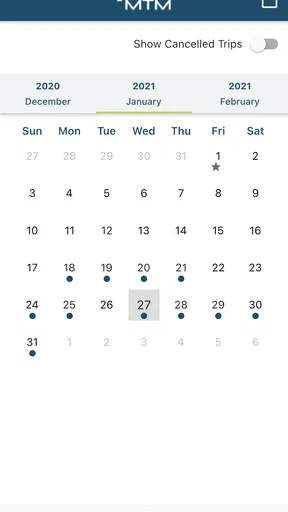
For those of us who are visually oriented, the app offers a neat calendar view. This allows you to see your entire month at a glance, helping you plan ahead and avoid last-minute rushes. It’s like having a bird’s eye view of your schedule, and honestly, it’s incredibly satisfying to see completed tasks getting ticked off.
Personal Experience
In my time using MTM Link Member, I noticed a significant boost in how efficiently I managed my tasks. The app’s ability to sync with my calendar meant I spent less time flipping between apps and more time actually getting things done. It’s like having an extra hour in your day, and who wouldn’t want that?
Moreover, the team aspect of the app is impressive. During a recent group project, the seamless file sharing and instant feedback features kept our team on the same page, reducing misunderstandings and increasing productivity. It felt like we were all in the same room, even though we were miles apart.
Ending Thoughts
In conclusion, MTM Link Member is more than just a productivity app; it’s a comprehensive tool that adapts to your workflow. Its user-friendly design, coupled with powerful features, makes it a must-have for anyone looking to enhance their productivity game. Whether you’re managing tasks solo or collaborating with a team, this app has got your back.
If you’re ready to take your productivity to the next level, give MTM Link Member a try and see how it can transform the way you work. Trust me, you won’t regret it!
A practical check before relying on it
There is an important mismatch between the ride-focused purpose suggested by the app’s name and the productivity, chat, calendar, and file-sharing features described in the experience above. I would not treat those collaboration details as established parts of a ride service without seeing them in the app myself. For a reader deciding whether to install it, the safest expectation is to approach it as a tool for managing rides and judge its current screens on that basis.
This matters most when planning an appointment or other trip where timing is important. I would avoid assuming that a ride has been requested, confirmed, changed, or completed until the app clearly shows that status. Open the relevant trip information, check what action is required, and make sure the arrangement is settled before leaving. A navigation app can help with the route, but it cannot replace checking that the ride itself is properly arranged.
How I would fit it alongside other travel apps
Most people already have a default map app, and there is little reason to abandon it if it reliably handles directions. The useful distinction is between organizing a ride and navigating after travel is underway. Keep the map app for route choices and live directions; use this one when its ride-management workflow matches the way you travel. That division avoids expecting one app to solve two different problems.
A calendar can still be useful for remembering when an appointment starts, while a notes app can hold a checklist or an address. Those tools are flexible, but they do not necessarily provide a dedicated ride workflow. Conversely, installing a specialized app does not automatically make it a better choice if your rides are occasional or arranged through another service. The best setup is the one that makes the handoff from planning to travel clear, without duplicating the same details in several places.
Small habits that reduce travel-day friction
I would set aside a quiet moment to learn the app rather than exploring it while standing outside and waiting. Check the account and trip screens, note where the app presents the information you need, and make sure you can return to it quickly. If another person helps with the arrangement, agree on who is responsible for checking the ride details; unclear ownership is a common source of avoidable last-minute stress, regardless of which app is involved.
For a trip with several stages, think of the ride and the rest of the journey separately. Confirm the ride plan in the ride-management tool, then use a map for the route or the final walk if needed. This simple split is more dependable than assuming an app focused on one stage will provide every detail for the full trip. It also makes it easier to spot what still needs attention before you leave.
MTM Link Member has a 4.0 average from around 6,400 ratings, with roughly 1,800 written reviews and over 100,000 installs. Those figures suggest that people have tried and rated it, but they cannot tell me whether it fits a particular travel routine. I would put more weight on whether the app’s present ride workflow matches your needs than on popularity alone.
On Android, the minimum operating-system requirement is version 7.0, which gives users a straightforward compatibility point to check before downloading. The app’s Everyone age rating is also useful context for households considering it, though an age label does not explain how a particular ride arrangement works. I would still review the on-screen steps with the person who will actually use the app, especially if someone else is helping manage their transportation.
What I would want to see from here
For existing users, the most valuable sign of progress would be clear, understandable changes to the ride workflow: easier access to trip details, fewer confusing steps, and information that is simple to check when plans change. Those are expectations, not claims about what the current version already does. A release number can mark a new build, but only the actual interface and release notes can show what changed in a way that matters to a rider.
Before making it part of an essential routine, I would also consider what happens when a plan needs attention. Can you quickly find the relevant ride information? Is it clear what to do next? Does the app present the status in a way you understand? These are the questions I would answer during a low-stakes trial, rather than discovering friction when an appointment is approaching. If the experience feels unclear, keep a dependable alternative arrangement available.
In the end, I see this as a specialist option for people whose transportation involves managing rides, not as a replacement for every map, calendar, or travel service on a phone. Its free price makes trying it less of a financial decision, but time and reliability still matter. If its current workflow suits your routine, it may earn a useful place on your device; if you only need directions or broad trip planning, your existing navigation app is probably the better fit.
Pros
- User-friendly interface for easy navigation.
- Seamless integration with existing systems.
- Real-time updates for accurate tracking.
- Customizable notifications for important alerts.
- Secure data encryption for user privacy.
Cons
- Limited offline functionality limits use.
- Occasional lag in high-traffic periods.
- Requires stable internet connection.
- Subscription fees can be expensive.
- Complex setup for non-tech users.
FAQs for MTM Link Member
What is MTM Link Member, and who is it for?
MTM Link Member is a mobile application designed to streamline communication and engagement within member-based organizations. It's ideal for clubs, non-profits, and community groups that need an efficient way to manage member interactions, events, and communications. The app offers tools to enhance member engagement and simplify administrative tasks.
What features does MTM Link Member offer?
MTM Link Member provides a range of features including event scheduling, member directories, group messaging, and notification alerts. It also supports document sharing and offers analytics to track member engagement. These tools are designed to help organizations maintain a cohesive and active community, enhancing overall communication and participation.
Is MTM Link Member available for both Android and iOS?
Yes, MTM Link Member is available for download on both Android and iOS platforms. Users can find the app on the Google Play Store for Android devices and the Apple App Store for iOS devices, ensuring accessibility for a wide range of users across different mobile platforms.
How secure is the data within MTM Link Member?
MTM Link Member prioritizes data security and employs industry-standard encryption to protect user information. The app ensures that all communications and stored data are secure, giving users peace of mind when sharing personal or organizational information. Regular updates also help maintain robust security measures.
Are there any costs associated with using MTM Link Member?
MTM Link Member offers a variety of pricing plans to cater to different organizational needs. While there is a free version available with basic features, premium plans unlock additional functionalities and support larger member bases. Users can choose a plan that best suits their organization’s requirements and budget.


